



9 Signs You Have Too Many Business Apps
What Are the Signs You Have Too Many Business Apps?
If your day starts with opening six tabs just to find out who needs a reply, your software may be creating more work than it removes. Adding an app can solve an immediate problem, but over time those individual solutions can become a scattered, expensive system that nobody fully understands.
"You probably have too many business apps when your team repeatedly enters the same information, switches between tools to complete one task, misses messages or follow-ups, pays for overlapping features, or cannot identify one reliable customer record. The problem is not a specific app count; it is the friction, cost and lost visibility those apps create."
The number alone does not decide whether you have “too many.” A business may use ten well-integrated tools efficiently, while another struggles with four disconnected ones. The practical question is: Does every app save more time or create more value than it costs to manage?
What does “business app overload” mean?
Business app overload is the point at which the time, cost and complexity of managing multiple software applications outweigh the value those applications provide.
It usually appears gradually. A company adds one tool for email marketing, another for online booking, another for invoices, another for customer reviews and another for social media. Each decision makes sense on its own. The trouble begins when customer information, conversations and tasks are split across those systems.
This is not only a subscription issue. It can also create:
Duplicate or outdated customer records
Manual copying and pasting
Missed leads and follow-ups
More passwords, permissions and security risks to manage
Inconsistent reporting
Longer employee training
A fragmented customer experience
The wider workplace data illustrates why simplification matters. Asana’s survey of 9,615 global knowledge workers reported that leaders used an average of 10 apps per day and lost 62% of the workday to repetitive, mundane tasks (Asana, Anatomy of Work Global Index). Microsoft later reported that employees were interrupted by a meeting, email or chat an average of 275 times per day in its analysis of survey and Microsoft 365 data (Microsoft, 2025 Work Trend Index). These are broad workforce findings, not small-business-specific benchmarks, but they show the operational pressure caused by fragmented digital work.
What are the clearest signs your business uses too many apps?
1. Are you entering the same information more than once?
A new lead completes a website form. Someone then copies the contact into a spreadsheet, adds the appointment to a calendar and enters the same details into invoicing software. That is duplicate data entry.
Every repeated entry takes time and creates another opportunity for a typo, missing field or outdated record. Ideally, customer information should enter one central system and update the connected conversation, appointment, sales opportunity and invoice automatically.
Example: If one employee spends just 20 minutes per workday moving information between apps, that equals approximately 7.3 hours per month:
20 minutes × 22 workdays ÷ 60 = 7.3 hours per month
At a labour cost of $30 per hour, that is about $219 per month, before counting subscription fees or the cost of errors.
2. Does one simple task require several logins or browser tabs?
Consider what it takes to respond to a new inquiry. Do you open your email, Facebook messages, booking calendar and CRM before you can answer one person?
An efficient workflow allows an employee to see the conversation, contact history, appointment status and next action together. When a basic task requires multiple tools, the problem is not just tab switching. The employee also has to remember what happened in each system and decide which record is current.
3. Are customer messages scattered across different inboxes?
Email, SMS, Facebook, Instagram, Google Business Profile and website chat can all generate leads. If each channel must be checked separately, a message can remain unanswered even when someone believes the inbox is clear.
A unified inbox is a shared workspace that brings messages from multiple communication channels into one conversation view. For a small business, this can make it easier to assign replies, see customer history and confirm that an inquiry received a response.
4. Do you pay for overlapping features?
Feature overlap happens when two or more subscriptions perform the same job. For example, your CRM may already include forms, email campaigns or appointment reminders while you continue paying for separate platforms that provide those features.
Review what each subscription actually does—not just why you originally purchased it. Software changes quickly, and a feature that once required a separate tool may now be included elsewhere in your technology stack.
How much can overlapping business apps really cost?
Here is a sample calculation for a small service business. These are illustrative amounts, not industry averages; replace them with the figures on your own invoices.
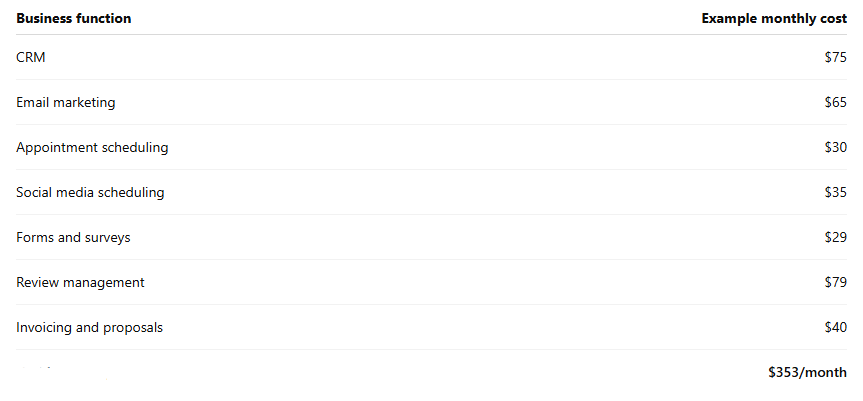
That annual total is $4,236 per year:
$353 × 12 months = $4,236 per year
Now add two hours per week of manual administration at $30 per hour:
2 hours × $30 × 52 weeks = $3,120 per year
In this example, the combined annual cost is $7,356. It does not include usage fees, additional users, integration tools, training, missed follow-ups or the cost of incorrect data.
5. Has your software bill grown without a clear return?
Small charges can escape notice, especially when they are billed to different cards or renew annually. Per-user pricing can also turn an affordable app into a significant expense as the team grows.
For each app, record:
Monthly or annual cost
Usage or messaging fees
Number of paid users
Main function
Features duplicated elsewhere
Weekly time saved
Business result supported
Contract renewal date
Do not keep an app because it might be useful. Keep it because someone uses it, it supports a necessary process and its result can be explained.
6. Does everyone know where the latest customer information lives?
A single source of truth is the designated system containing the most current and reliable version of important business data. Without one, a phone number may be updated in the invoicing app but remain incorrect in the email platform. One employee may record a customer request in notes while another looks only at the CRM.
This fragmentation makes personalization harder and reporting less trustworthy. It can also create awkward customer experiences, such as asking for information the customer has already provided.
7. Are leads or follow-ups falling through the cracks?
Disconnected software often relies on a person to move the process forward: copy the lead, send the confirmation, create the task, issue the estimate and remember to follow up.
If any step depends on memory, it can be missed during a busy day. Workflow automation uses a defined trigger and action to move routine work forward—for example, sending an appointment confirmation automatically when a booking is created or creating a follow-up task when an estimate has not been accepted.
If missed calls are part of the problem, use our Revenue Leak Calculator to estimate how much potential revenue may be going unanswered.
8. Is onboarding a new employee unnecessarily complicated?
New employees should not need a map of passwords, browser tabs and workarounds before they can help a customer. When onboarding requires training on many overlapping systems, it takes longer and creates inconsistent processes.
A simpler software stack can reduce the number of interfaces an employee must learn. It can also make permissions easier to review when someone joins, changes roles or leaves the company.
9. Are integrations constantly breaking or requiring maintenance?
An integration connects separate applications so information or actions can pass between them. Integrations can be extremely useful, but every connection adds another point that may need monitoring.
Warning signs include:
Contacts fail to sync
Automations create duplicates
A password change disconnects a workflow
An app update changes a required field
Nobody receives an alert when a connection fails
If your team spends substantial time maintaining the connections between apps, consolidating compatible functions may be more reliable than adding another integration.
How can you tell which business apps to keep, replace or cancel?
Start with a 30-day software audit:
List every paid and free app used by the business.
Assign an owner responsible for each app.
Record its total cost, including users and usage fees.
Write down the business process it supports.
Identify overlapping features and duplicate data.
Measure actual use for 30 days.
Mark each app keep, replace, consolidate or cancel.
Do not cancel software immediately because two tools appear similar. Confirm where data is stored, whether records must be exported, which automations depend on it and when the contract renews. Accounting, payroll, industry-specific and compliance-sensitive systems may be worth keeping even when other functions are consolidated.
Okta’s 2025 business software report found an average of 101 deployed apps per organization among its global customers, while Canadian organizations averaged 70 (Okta, Businesses at Work 2025). Those figures include organizations of different sizes and types, so they should not be treated as a target for a small business. They do demonstrate that app inventories can become large enough that formal oversight matters.
Is an all-in-one CRM always the right answer?
No. Specialized businesses may still require dedicated accounting, payroll, field-service, clinical or industry-specific systems. The goal is not necessarily to operate with one app. The goal is to remove unnecessary overlap and connect the systems that remain.
An all-in-one CRM can be a strong central platform when it combines commonly connected customer functions, such as:
Contact and lead management
Email, SMS and social conversations
Online appointment booking
Forms and website chat
Estimates, invoices and payment links
Email and marketing automation
Review requests
Social media scheduling
Learn how WinChilla brings these functions together on our All-in-One CRM service.
What should you do next if your apps are creating more work?
Choose one high-friction process, such as responding to a lead or booking a new customer. Map every app, manual entry and handoff involved from beginning to end. Then calculate the subscription cost and employee time attached to that process.
You do not need to replace everything at once. Start by consolidating the clearest overlap, moving one reliable data set and testing the new workflow before cancelling the old tool.
WinChilla offers free consultations to see where you could be saving time and possibly also using less disconnected apps.
Frequently asked questions about using too many business apps
How many business apps are too many?
There is no universal limit. You have too many when overlapping subscriptions, duplicate entry, switching and maintenance cost more than the apps save. Audit the business result, total cost and time saved by each tool instead of relying on an arbitrary number.
What is app sprawl?
App sprawl is the uncontrolled growth of software applications across a business. It often occurs when employees or departments add tools independently, leaving the company with duplicated functions, scattered data and subscriptions that are difficult to track.
What is software consolidation?
Software consolidation means reducing the number of separate applications by moving compatible functions into fewer platforms. A good consolidation plan preserves necessary specialist tools while removing redundant subscriptions and manual transfers.
How often should a small business audit its software subscriptions?
A quarterly light review and a detailed annual audit are practical starting points. Also review the stack before annual renewals, after staffing changes and whenever you add a platform with features that overlap existing tools.
Can too many apps cause missed leads?
Yes. When inquiries arrive in separate inboxes or must be manually transferred into a CRM, delays and omissions become more likely. A unified inbox and automated follow-up process can reduce reliance on employees remembering each step.
Ready to simplify your business software?
WinChilla combines customer management, conversations, calendars, marketing, reviews, invoicing and automation in one platform—so small businesses can spend less time switching systems and more time serving customers.
Book a WinChilla CRM demo to review your current software stack and see which tools you may be able to consolidate.


