
Roofing CRM That Helps Turn More Leads Into Jobs
Capture new leads, answer calls and messages, book roof inspections, manage your sales pipeline, and automate follow-up. WinChilla keeps it all in one place.




One Roofing CRM for Leads, Follow-Up, and Growth
Keep contacts, calls, texts, email, bookings, estimates, deals, and review requests linked. Your office and sales teams stay organized while crews focus on the roof.
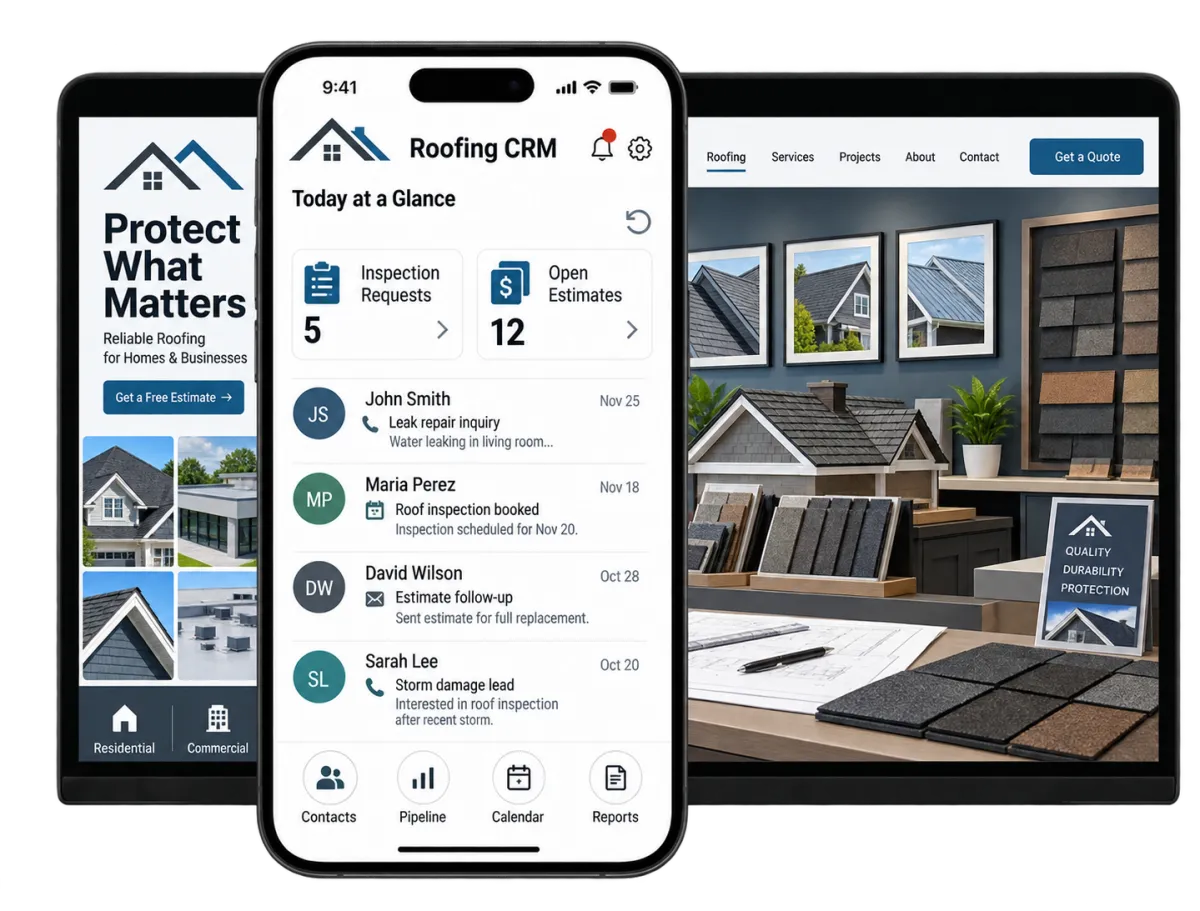
Run the Customer Side of Your Roofing Business With Less Friction
Roofing owners and managers juggle urgent calls, site visits, inspections, estimates, follow-up, reviews, and marketing. WinChilla brings that work into one roofing CRM. Fewer leads get lost in scattered inboxes or forgotten notes.
of roofers respond to new leads within 12 hours, while the highest-rated roofing companies respond in under 30 minutes.
Source: JobNimbus
of homeowners read reviews before calling a roofing company.
Source: JobNimbus
of roofers now use a CRM, while adoption of automated texts, reminders, and AI tools reached record levels in a 2026 study.
Source: JobNimbus
Does this sound familiar?
Your team is on a roof, driving to an inspection, or helping a customer when the next lead calls. By the time you check the voicemail, the homeowner may have booked another roofer. Other leads get an estimate but no follow-up.
Don't worry, we can help!
Phone System & AI Receptionists
Keep calls linked to each contact while an AI receptionist answers questions, gathers details, qualifies leads, books inspections, and transfers urgent callers.
Automated Lead Follow-Up
Use workflows to reply to new leads, assign tasks, send reminders, update deals, and follow up on open estimates.
Roofing Sales Pipeline
Give your team one view of new leads, booked inspections, estimates, decisions, and closed jobs.

Respond Before the Lead Calls the Next Roofer
Roofing leads often call while your team is away from a desk. WinChilla helps you capture the request, start a chat, and book the next step.
Phone System & AI Receptionist
Handle calls through supported business numbers. Add an AI receptionist when it fits your lead process.
Link inbound and outbound calls to each homeowner or property contact
Route calls by business hours, user, team, or department
Let AI answer common questions, gather job details, and screen leads
Book an inspection or transfer an urgent caller to the right staff member
Review call logs, recordings, transcripts, summaries, results, and follow-up


Web Chat and Conversation AI
Turn website visits into useful chats, even when the office is closed.
Capture the visitor’s name, contact details, service address, and message
Answer common questions from approved business facts and knowledge sources
Ask if the job is a leak, storm claim, repair, replacement, or commercial project
Help qualified visitors schedule an inspection in supported setups
Transfer the conversation to staff when human attention is needed
Lead-Capture Forms
Capture roofing leads with embedded or stand-alone forms. Send each response to the CRM.
Create forms for roof inspections, repair requests, commercial inquiries, and storm-damage leads
Collect contact details, property facts, service type, and preferred times
Use custom fields and conditional logic to gather more relevant details
Trigger staff alerts, pipeline records, and follow-up after each form is sent


Keep Every Roofing Opportunity Moving
A roofing CRM should show who needs help and what happens next. WinChilla links the contact, messages, booking, deal, and follow-up history.
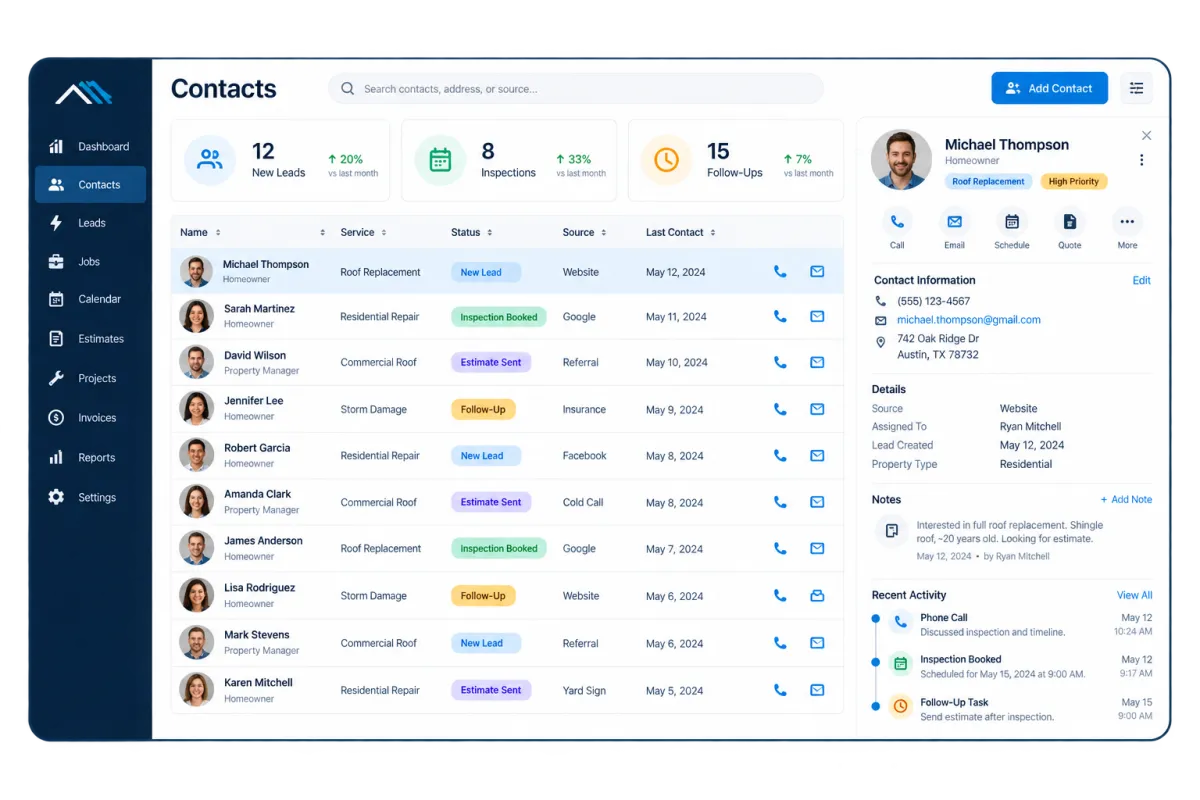
Contacts & CRM
Keep details for homeowners, property managers, commercial leads, and referral sources in one record.
Store contact details, notes, files, tags, custom fields, and past activity
Track needs such as repair, replacement, upkeep, or storm work
Group contacts by source, service area, job type, or sales stage
Build smart lists for unresponsive leads, past customers, or seasonal outreach
Opportunities & Pipelines
Track each roofing job through stages that match your sales process.
Create stages such as New Lead, Contacted, Inspection Booked, Estimate Sent, Won, and Lost
Assign an owner and keep the notes, status, and value with the deal
Filter deals by sales rep, service, location, source, or stage
Automate selected follow-up steps and pipeline movement from workflows


Conversations
Bring supported calls, texts, email, web chat, WhatsApp, and social messages into one inbox.
See past messages before you reply to a homeowner or property manager
Reduce missed handoffs between office staff, estimators, and sales reps
Filter and assign conversations so each inquiry has a clear owner
Use AI-assisted replies in supported inbox views, with staff review when needed

Build a Faster Roofing CRM Follow-Up System
Steady contact can keep a good lead from going cold. Set follow-up for new leads, roof inspections, open estimates, and older deals.
Workflows and Automation
Automate routine sales steps while your team stays in control.
Send a quick reply after a form, call, or supported message
Create tasks for staff when a lead needs a personal call
Follow up after an inspection or estimate based on its sales stage
Trigger reminders, staff alerts, contact updates, and pipeline steps
Use the AI workflow builder to create an automation from a plain-language goal


Calendars and Appointments
Make it easier for leads and staff to book inspections or calls.
Create calendars for home inspections, commercial calls, and sales visits
Set staff hours and use round-robin booking where it fits
Add booking calendars to forms, websites, funnels, or chat
Send confirmations and reminders through supported channels
Let AI agents help qualified prospects book
SMS, MMS, and Email Follow-Up
Reach leads through familiar channels and keep each message in the roofing CRM.
Confirm a new lead was received and share the next step
Remind homeowners about inspections or scheduled calls
Send approved follow-up when an estimate gets no reply
Share supported links, attachments, photos, or documents when appropriate
Track delivery, failed sends, replies, opt-outs, opens, and clicks


Turn Completed Roofing Work Into Reviews and Referrals
A good customer tie can add value after the job is done. WinChilla helps roofers ask for feedback, stay in view, and track which campaigns bring in leads.
Reputation Management
Build a steady review process and manage supported feedback in one place.
Send review requests through supported channels after completed work
Track ratings, review volume, recent feedback, sentiment, and common themes
Use AI to suggest or post replies to supported Google and Facebook reviews
Display selected reviews and testimonials through customizable widgets


Email Marketing
Stay in touch with past clients, leads, property managers, and referral sources.
Send seasonal maintenance reminders and weather-related preparation tips
Follow up with older leads who postponed a roofing project
Share finance options, service updates, or new service areas
Target messages with tags, smart lists, contact groups, and CRM details
Use AI assistance to refine subject lines, calls to action, images, and campaign copy
Social Planner
Plan and post useful roofing content across supported social and business profiles.
Schedule project highlights, maintenance tips, team updates, and storm-season reminders
Tailor posts for each supported channel instead of using the same copy everywhere
Use AI assistance to develop captions, campaign ideas, hashtags, and images
Track engagement and post performance across supported accounts


Dashboards and Reporting
See where roofing leads come from and how they move toward a sale.
Track deals by stage, owner, source, date, or campaign
Review call, booking, website, ad, payment, and pipeline data where supported
Build role-specific dashboards for owners, office managers, and sales leaders
Schedule, export, or share reports for regular sales meetings
More Tools for a Better-Connected Roofing Business
Add useful tools for field access, sales, billing, marketing, and team work.
Websites and Funnels
Build pages for roof inspections, storm campaigns, commercial work, or local service areas. Link each response to the CRM.
Invoices and Estimates
Create and send branded estimates or invoices, collect supported payments, and automate payment reminders.
Mobile App
Check contacts, messages, deals, bookings, tasks, and call notes while travelling between jobs.
Ad Manager
Manage supported Google, Facebook, Instagram, and LinkedIn ads. Review leads, sales, spend, and return on investment in one view.
Integrations
Connect supported calendars, payment providers, accounting tools, Google services, Zapier, APIs, webhooks, and marketplace applications.
Documents and Contracts
Send proposals, terms, quotes, or contracts for e-signature. Start the next step when a file is viewed or signed.
Roofing CRM Questions From Contractors
What does roofing CRM software help a roofing company manage?
WinChilla helps manage the customer journey from the first lead through follow-up. It can link contacts, calls, texts, email, bookings, deals, tasks, files, invoices, and reviews. Your team can see who needs a reply and which jobs are moving ahead.
Can WinChilla work as a roofing answering service?
WinChilla has business calling tools and supports Voice AI receptionists. They can answer calls, handle common questions, gather details, screen leads, book visits, or transfer callers. This is an automated option, not a live human roofing answering service. Setup, phone and AI use, and supported actions may affect cost and fit.
Can WinChilla help with lead generation for roofers?
WinChilla supports lead generation for roofers with websites, landing pages, forms, chat, calendars, ad tools, contact records, and follow-up. It can capture and manage leads from your marketing. It does not promise lead volume or replace the plan, budget, and work needed to attract the right prospects.
Is WinChilla the best CRM for roofing companies that manage production?
The best CRM for roofing companies depends on your main need. WinChilla is built for lead capture, customer messages, sales pipelines, booking, marketing, follow-up, reviews, and related payments. Roof measures, material orders, claim supplements, crew schedules, safety, and detailed job costs may need special roofing contractor software or a supported link.
Can separate salespeople or locations use the same roofing CRM?
WinChilla can assign contacts, chats, deals, bookings, and tasks to team members. Pipelines, filters, calendars, reports, business hours, routing, and supported review profiles can sort work by owner, team, campaign, or site. The right setup depends on how you split service areas and duties.
Can WinChilla follow up after a roofing estimate is sent?
Yes. A workflow can send supported reminders, create staff tasks, update records, and start follow-up based on CRM or file activity. Your team sets the timing, channels, and stop rules. Review the process so it fits the job and the customer’s contact choices.
What others are saying:
"Love everything so far"
"I've never set up a website before but I love managing my new site and leads. The WinChilla team has been really helpful whenever I got stuck."
- Laura P

"Simplifies my sales"
"I've been able to help my son promote his candy business which has been great because I am not good with computers at all."
- Robert T
"Highly recommend"
"It's exciting to see my visions come to life and WinChilla helps me manage everything in one place so I can be anywhere in the world and my business just runs."
- Jaret H
WinChilla works with platforms you already use such as


















Real Support for Your Next Step
30-Day Money-Back Guarantee
New customers can get started with a 30-day money-back guarantee on eligible subscription fees. Review the refund terms for coverage, exclusions, and how to request a refund.
Onboarding and 24/7 Support
Start with a technical setup call and a training call, then get help through 24/7 chat support. Use our tutorials and knowledge base as you build and refine the tools your business needs.
Helping Businesses Since 2010
Our founders bring more than 30 years of combined experience in business software and customer incentive programs, helping small businesses build stronger customer relationships.

Stop Letting Good Roofing Leads Go Cold

© 2024-2026 Loyalty Gator Inc. All rights reserved.
WinChilla CRM | A Loyalty Gator Company | Trusted Since 2010
The information provided by Loyalty Gator Inc. (DBA: WinChilla) ('we', 'us', or 'our') on WinChilla’s website (the 'Site') and our mobile application is for general informational purposes only. All information on the Site and our mobile application is provided in good faith, however we make no representation or warranty of any kind, express or implied, regarding the accuracy, adequacy, validity, reliability, availability, or completeness of any information on the Site or our mobile application. UNDER NO CIRCUMSTANCE SHALL WE HAVE ANY LIABILITY TO YOU FOR ANY LOSS OR DAMAGE OF ANY KIND INCURRED AS A RESULT OF THE USE OF THE SITE OR OUR MOBILE APPLICATION OR RELIANCE ON ANY INFORMATION PROVIDED ON THE SITE AND OUR MOBILE APPLICATION. YOUR USE OF THE SITE AND OUR MOBILE APPLICATION AND YOUR RELIANCE ON ANY INFORMATION ON THE SITE AND OUR MOBILE APPLICATION IS SOLELY AT YOUR OWN RISK.